group_addGetting Started & Agency Setup
Manage Team Roles, Workspace Views & Navigation
Updated October 2026•3 min read•For: Broker Admins, Producers & Assistants
verifiedQuick Summary
Open Team Directory (/team) to invite Producers (Agents) and Assistants to your brokerage. In the left navigation sidebar, use the Workspace and Agent View dropdowns to filter your client roster and pending tasks by producer, and use the Inbox and Tasks icons in the sidebar header to track client portal requests and background policy extractions.
In this article
1. Invite a Producer or Assistant
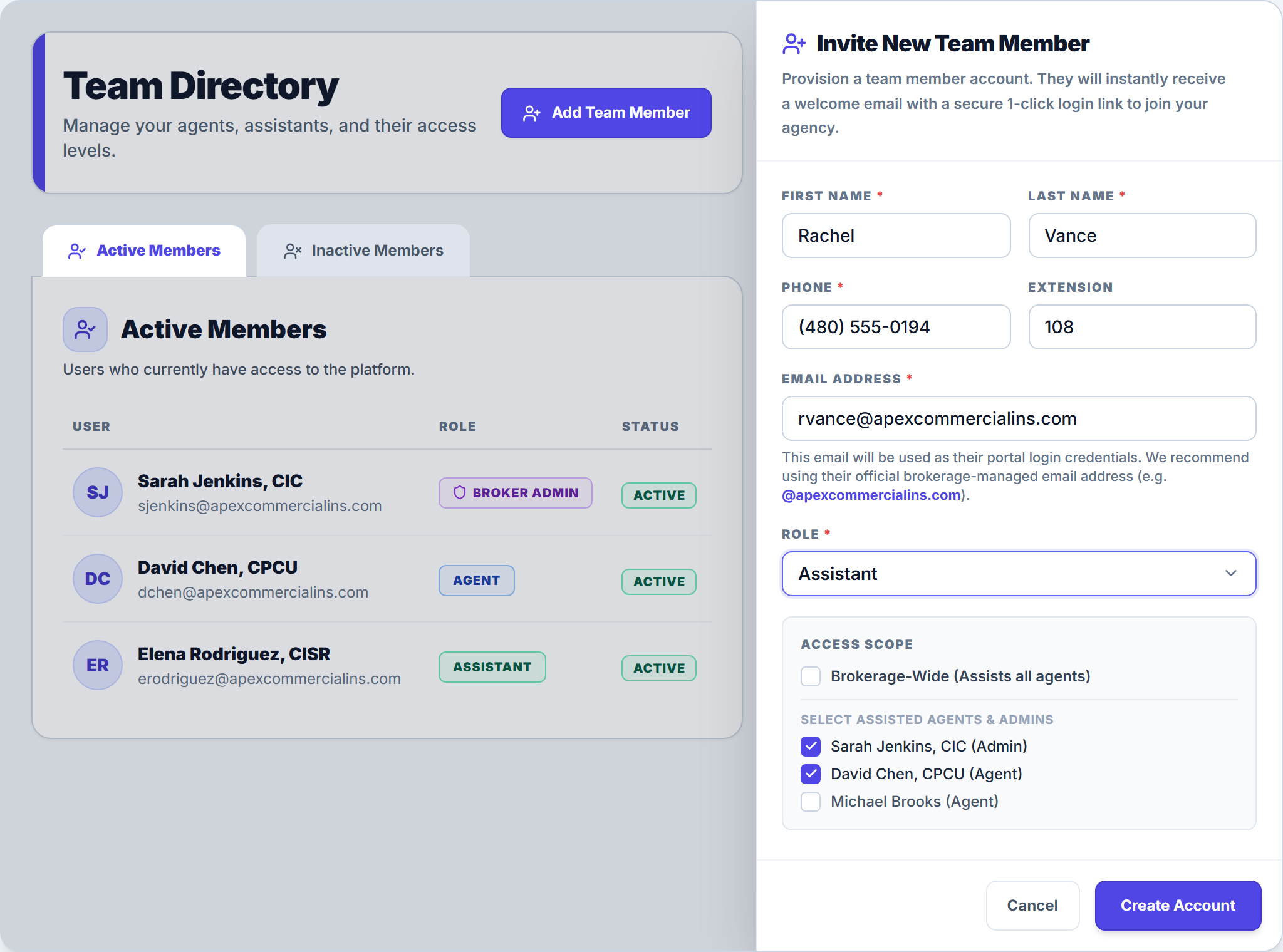
- Click Team in the dark left navigation sidebar to open the Team Directory.
- Click the indigo Add Team Member button in the top-right header to open the Invite New Team Member drawer.
- Enter the team member’s First name, Last name, Phone, optional Extension, and agency Email address.
- Select their Role (Agent or Assistant). When Assistant is selected, configure Access Scope: either check Brokerage-Wide (Assists all agents) or select specific producers under Select Assisted Agents & Admins.
- Click Create Account to provision their account and automatically send their 1-click welcome login link.
2. Role Permissions & Mobile Access
| Role | Workspace Access | Mobile Access |
|---|---|---|
| Broker Admin | Full agency roster, billing, team directory, and brokerage settings | Full mobile access |
| Agent (Producer) | Assigned commercial clients, policies, certificate holders, and COI issuance | Full mobile access (scoped to assigned book) |
| Assistant | Policy review, endorsement slicing, and COI prep for assigned producers | Desktop browser required |
3. Sidebar Navigation: Workspace, Agent View, Inbox & Tasks
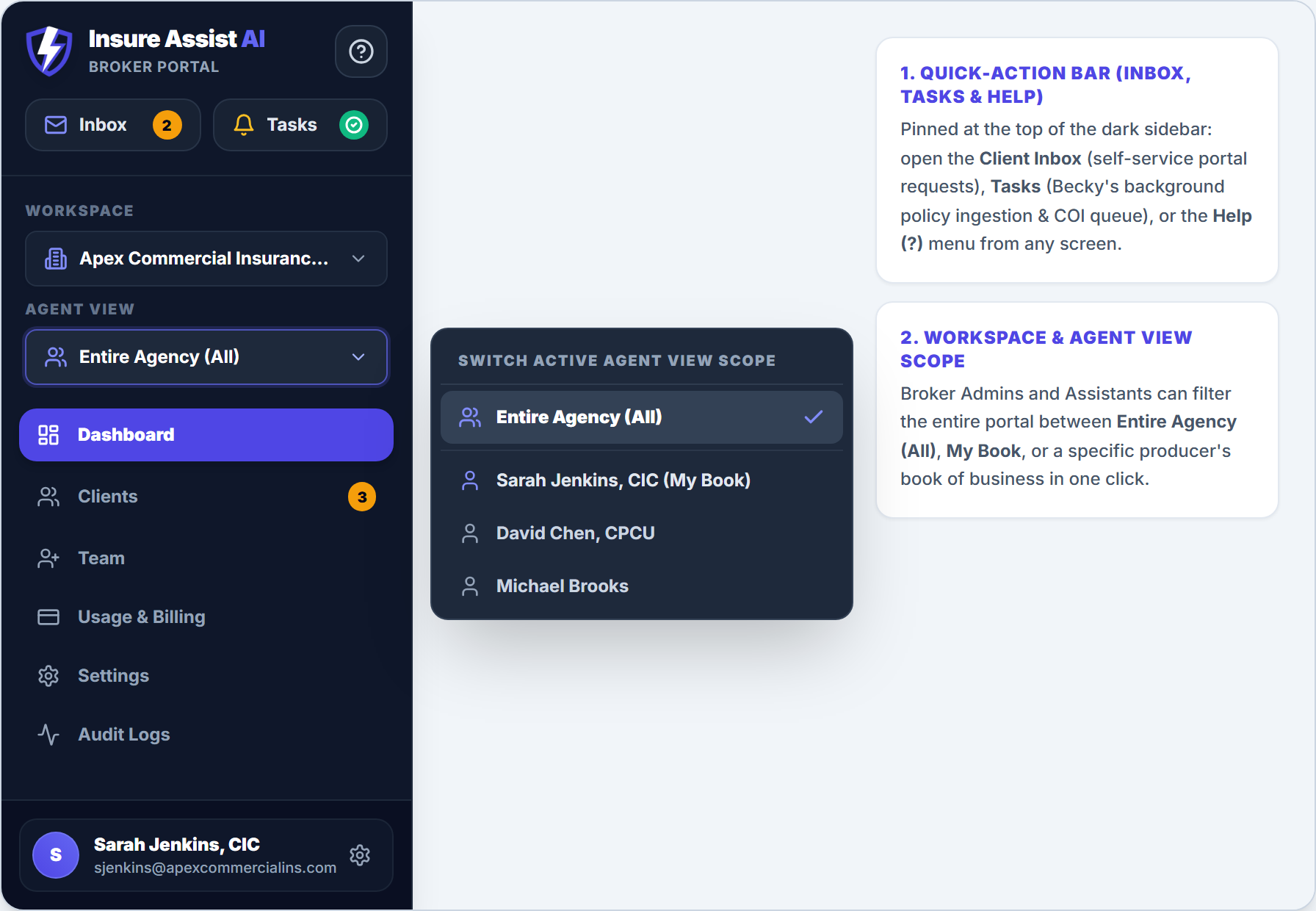
The persistent dark left sidebar gives you 1-click access to your agency controls from any screen:
- Workspace Selector: Switch between branch offices or agency workspaces if your account belongs to multiple brokerages.
- Agent View (Producer Scope): Filter the dashboard and client list between Entire Agency (All), My Book, or a specific producer.
- Inbox (Quick-Action Bar): View incoming certificate requests and holder updates submitted by clients from the Client Self-Service Portal.
- Tasks (Bell Icon): Monitor background policy PDF extractions and jump directly to completed policy reviews.
Frequently Asked Questions
Deactivating a user immediately revokes their login session while preserving all historical audit logs and issued certificates. You can reassign their clients (such as ACME Contractors, LLC) to another active producer in Client Setup.
Related Guides in Getting Started & Agency Setup
Was this article helpful?
Let our team know if you found what you needed.
arrow_backPrevious Article
Connect Microsoft 365 or Google Workspace Email
Next Articlearrow_forward
Upload Policies & Documents in Becky's Inbox
Automate Your Commercial Agency Operations
Put Becky to work for your agency to review policies, audit coverage gaps, and issue verified ACORD certificates in seconds.