Manage Subscription Plans, Credits & Invoices
1. Subscription Tiers & Pooled Monthly Credits
Insure Assist AI offers three monthly agency tiers shared across every producer and CSR in your brokerage, with unlimited team seats on every plan. New signups on Basic and Pro include your First Month Free with no card required, and Enterprise signups begin on a free Month-1 Pro workspace (250 credits) so your team can test right away before adding a card to unlock full 600-credit Enterprise capacity. Logged-in Broker Admins can click View Item-by-Item Credit Rate Card inside Usage & Billing anytime to review exact credit weights.
| Agency Plan | Monthly Price | Included Credits | Overage Rate |
|---|---|---|---|
| Basic (First Month Free) | $149 / month | 100 Unified Credits | $1.25 / credit |
| Pro (First Month Free) | $299 / month | 250 Unified Credits | $1.15 / credit |
| Enterprise | $599 / month | 600 Unified Credits | $1.00 / credit |
2. Manage Your Card & Billing Account Email
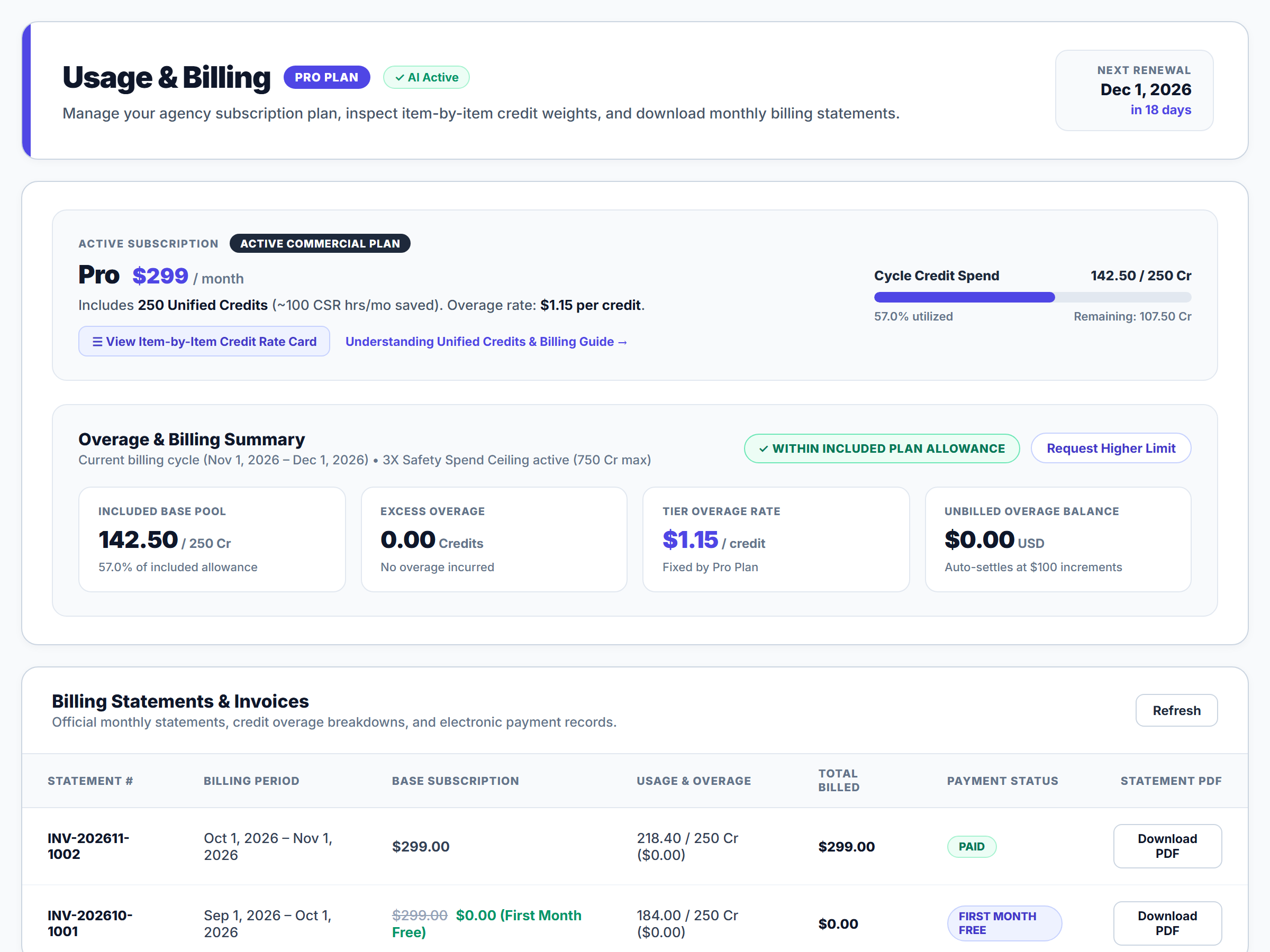
In the top summary card on Usage & Billing, confirm or click Edit next to Billing Account Email so Stripe card setup and monthly PDF statements route to the right accounting inbox, then click Add Card or Update under Payment Method to open Stripe Hosted Card Setup. Saving a card unlocks your standard 3X monthly Overage Limit beyond your included credits (cardless free trials cap strictly at 1X included credits, and unactivated trials are retained for 90 days after trial end).
3. Track $100 Mid-Cycle Overages & Grace Rules
The summary card tracks your Cycle Credits Used, Additional Credits Used, and Unbilled Balance in real time. Each time unbilled overage reaches $100 within a cycle, your saved card settles that increment automatically and issues a receipt, while any remaining balance below $100 bills at monthly cycle close (or click Adjust Overage to choose 1X, 2X, 3X, or 5X, plus 10X on Enterprise). If a charge ever declines, credit-consuming AI actions pause right away and your agency gets a 3-day read-only grace window to view and export existing schedules and issued certificates before Day-4 suspension. Updating your card or clicking Pay Past-Due Balance & Reactivate restores full AI access right away.
4. Download Invoices or Cancel Into Read-Only Archive
Open the Statements & Invoices tab to inspect monthly renewals, plan upgrades, and mid-cycle overage statements, or click PDF on any row. Need to step away for a season? Open the Subscription Plans tab and click Cancel Subscription at the bottom to schedule cancellation for the end of your current billing period. You keep full workspace access through your paid renewal date, and afterward your agency moves into Read-Only Archive Mode at $0/month for up to 12 months (with a 30-day advance email notice before deletion), preserving historical policy schedules and 0.00 credit certificate re-downloads for E&O compliance and 1-click reactivation anytime. If your agency ever wants immediate permanent workspace deletion instead, email [email protected] and we will wipe all agency data within 7 business days.
Frequently Asked Questions
Related Guides in Client Portal, Security & Billing
Was this article helpful?
Let our team know if you found what you needed.
Automate Your Commercial Agency Operations
Put Becky to work for your agency to review policies, audit coverage gaps, and issue verified ACORD certificates in seconds.